
Surface Meshing Best Practices
Meshing techniques are ever-evolving as certain blocks get updated. In general, the main blocks for surface meshing, in order, are:
- Mesh from Implicit Body (MFIB)
- Simplify Mesh by Threshold (or Simplify Mesh by Amount)
- Remesh Surface (for analysis, especially in nTop)
Note: More information on each of these blocks can be found in our 102: Guide to Meshing course.
Step 1: Mesh from Implicit Body
This block will almost always create a mesh too dense or large to do anything practical. Still, it is the first step in discretizing your Implicit and capturing the geometric fidelity required for printing and analysis.
For our TPMS HEX, we should consider two main questions. Are you meshing for analyses, or are you meshing for printing? In general, this will mean, are we meshing the fluid domains or meshing the solid part?
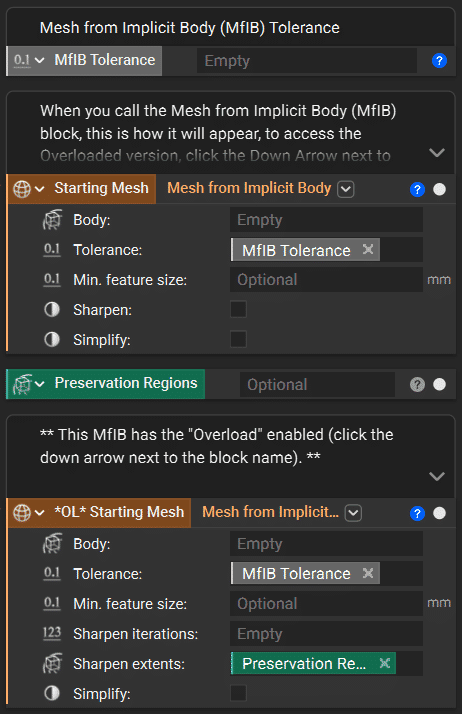
For analysis, we generally want to ensure that the faces where we apply our inlet and outlet boundary conditions have preserved sharp edges, allowing for the whole area to be utilized. Therefore, we want to access the Overload in the MfIB and define the Sharpen Extents (the regions we want sharpness persevered). This option makes the block solve quicker and potentially causes fewer issues downstream. We also recommend setting the Sharpen Iterations to 3 in most cases; however, early in the design process, one iteration may be sufficient and improve solve time.
For manufacturing, especially out of metals, it’s highly unlikely that sharp edges will be present after the build is complete. These are usually machined in after printing as required. Therefore, we can use the default MfIB block. (Note, the default block allows for Sharpen, but this will evaluate at the entire body and defaults to an iteration value of 1).
The Min feature size input can be a great tool for removing very thin sections, small burrs, etc., that happened to get generated in the model. Any implicit feature smaller than this value will be omitted from the mesh.
Step 2: Simplifying by Threshold (or Amount)
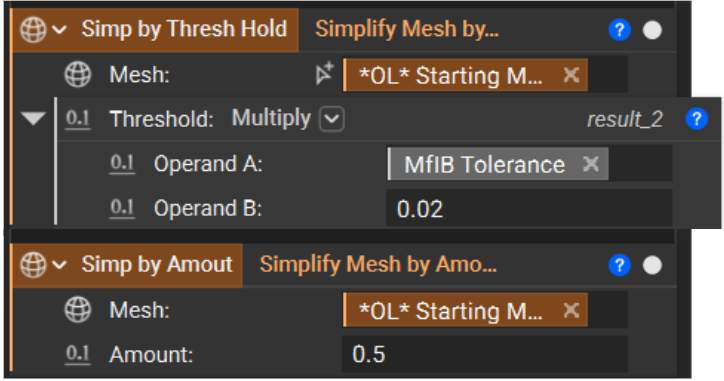
Since the Tolerance value in MfIB is generally a % value of a part’s minimum feature size, many of the initial mesh elements are significantly smaller than needed to preserve the required fidelity. A simplification step will increase/decimate the element size in larger areas. In the case of a TPMS or any lattice, most of our elements will be on the lattice. Therefore, Simplify by Threshold is the preferred method as the governing input that drives the mesh decimation is a ‘surface deviation’ / Threshold value (akin to Chord Height). This will tell the block that it can decimate as much as possible while allowing the Remesh Surface to deviate no further than +/- the Threshold value. The Simplify by Amount forces a certain % decimation, meaning if the majority of my implicit body is a lattice (i.e., where most of my elements are), it won’t care about geometric fidelity, just achieve the % decimation.
Note: A good rule of thumb for Simplify Mesh by Threshold is to start with a value between 1%-10% of the incoming Mesh from Implicit Body Tolerance value.
If you are going to print, this could be and is likely a great place to stop. Right-click on the block and Export or use the Export Mesh block.
Depending on your downstream analysis systems, meshing capabilities, this could also be a good place to stop and export for meshing in your CAE tool.
Step 3: Remesh Surface
This block will generally be used for analysis only and, in some cases, manufacturing.
It is important to note that this block is a third-party meshing block and is currently single-threaded. The speed of the block is highly dependent on the number of incoming elements, which is why we recommend simplifying the mesh before remeshing.
Key Inputs for the Remesh Surface
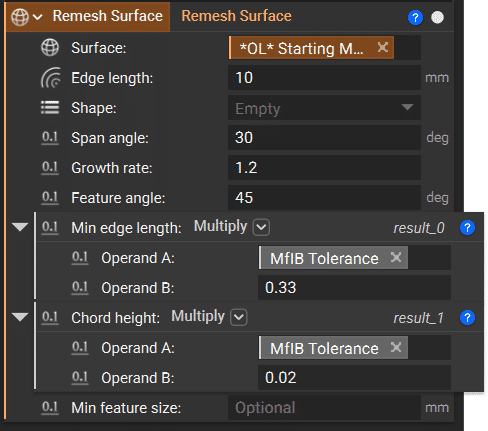
If we use the other parameters (especially Chord Height) to control the element size and preserve fidelity, this value can be set to quite a large number, helping the block solve faster. Depending on how the mesh looks and how long it takes to run, you can increase or decrease it.
It is highly encouraged that the growth rate be set between 1.2 – 1.5
This value defaults to zero and is generally left there. However, the element sizes that tend to get created, especially on fillets, will often be smaller than is required. This value can be tuned to achieve a quality mesh for analysis, and not defaulting to zero can significantly impact the solve time.
Akin to the Threshold value in Simplify Mesh by Threshold, this will be the allowable surface deviation and will be the primary factor in determining the mesh quality.