
Defining a Material
There are three options for materials in nTop: Isotropic, Anisotropic, and Orthotropic. Isotropic materials have the same properties in every direction. Anisotropic materials are the opposite, and have different properties in different directions. Orthotropic materials have properties that vary in three directions. An example of an isotropic material is steel, an anisotropic material is wood, and an orthotropic material is most crystals.
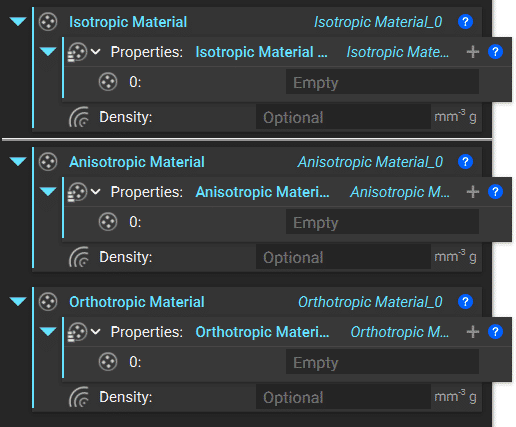
Material Properties
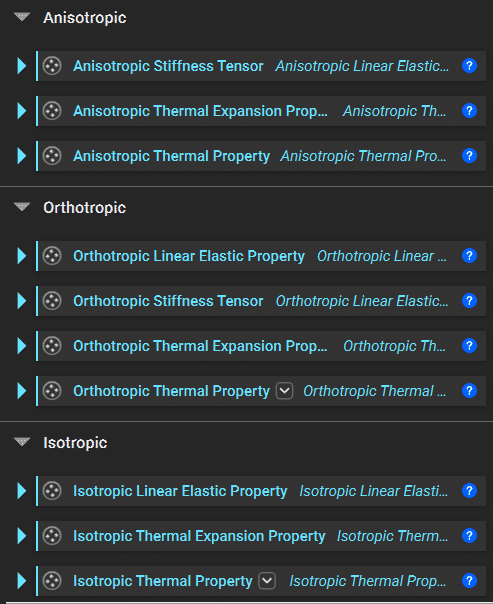
For isotropic and orthotropic material blocks, you can add a Linear Elastic Property. The anisotropic and orthotropic materials have Stiffness Tensor blocks. For all of these materials, you can add Coefficient of Thermal Expansion and Thermal Property blocks. Add the Property blocks to the Isotropic Material Property List. Use the ‘+’ to add more inputs to the list. All of these available blocks are shown in the image below.
| Analysis | Material Property Required to Run |
|---|---|
| Static, Modal, Buckling, Topology Optimization | Linear Elastic Property |
| Thermal | Linear Elastic Property, Thermal Property |
| Thermoelastic | Linear Elastic Property, Thermal Property, Coefficient of Thermal Expansion |

Frequently Used Materials
nTop also has a selection of sample materials under the Design Analysis section in the Ribbon. If you plan to use these materials for Thermoelastic Analysis, you will need to add the additional property of the Isotropic Coefficient of Thermal Expansion.

Tip:
If you use a material often, we recommend creating it in a standalone Notebook and saving it as a Custom Block with no inputs. Check out our 230: Intro to Automation course to learn more about creating a Custom Block.