
Solid / Volume Meshes
There are multiple ways to create a solid or volume mesh for simulation or latticing. Below are the most common blocks to create volume meshes. Remember that surface mesh lays the framework for your volume mesh. If you want to adjust your volume mesh, consider changing the surface mesh. Other synonyms for volume mesh include tet mesh, discretization, and solid mesh.
Volume Mesh
The Volume Mesh block creates a solid mesh with tetrahedral elements. If using a volume mesh for an FE Mesh, we recommend using a Remesh Surface block before placing the mesh in the domain input for the volume mesh.

The Growth rate is a ratio that defines the maximum growth of an element in relation to the adjacent cell. A general rule of thumb is to use a growth rate of 1.2.
Note: Overcoming a failed Volume Mesh? Try using the Split Mesh block to isolate the main structure or the Collapse Vertices block to remove intersecting triangles. If there are still issues, try changing the surface mesh parameters or use the Robust Tetrahedral Mesh block.
Delaunay Volume Mesh
The Delaunay Volume Mesh block forms a mesh by connecting the points using the Delaunay tetrahedralization. The points can be user-defined, random, or imported from another program.

Robust Tetrahedral Mesh
The Robust Tetrahedral Mesh block will remesh the input boundary to generate valid, high-quality elements. This block uses algorithms that are tolerant of defects such as self-intersections. If the input mesh does not have defects, consider using the faster Volume Mesh block.
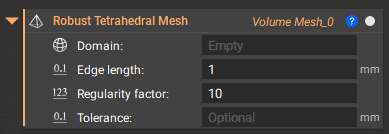
Note: To reduce the computation time, try raising the tolerance. We recommend using this block only for hard-to-mesh regions (where it is needed) and using Tie Constraints or Merge FE Meshes to connect to meshes created with easier or faster blocks.