
Remesh Surface
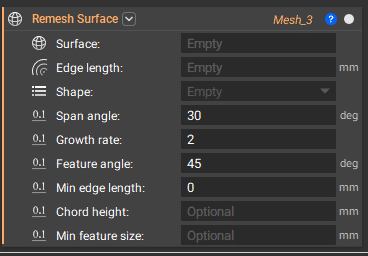
The Remesh Surface block cleans up defects in a mesh, consolidates meshes into fewer elements, and/or spatially varies the mesh density. It gives more control over the size, shape, and uniformity of the original mesh. Use this block to generate FEA-quality meshes for downstream analysis.
Tip:
Useful in converting a surface mesh to a solid mesh. When doing this, ensure the Edge length is the same size for the Remesh Surface block and the Solid Mesh block to create tetrahedral elements.
The Edge Length should be greater than the feature size of the input Mesh. Start high and reduce it until you are happy with how it looks.
Minimum Feature Size: If you are setting a minimum Feature Size, we recommend to use 5% of the chosen Edge Length.
You want to balance fidelity and computing time.
Too many elements = long computing time, and not enough elements = low fidelity.
Shape: Triangular is the most commonly used and most efficient. Quad and Quad-dominated can’t be converted to a volume mesh in nTop but you can use it in CAD Body from Quad Mesh.
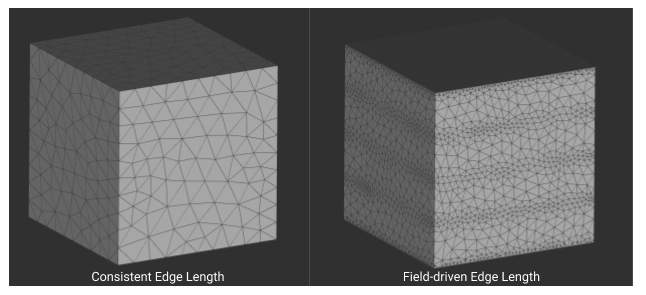
Edge length: Specifies the approximate edge length of the mesh elements. It can be a singular, consistent value, or a scalar field, meaning you can spatially vary the size of the mesh.
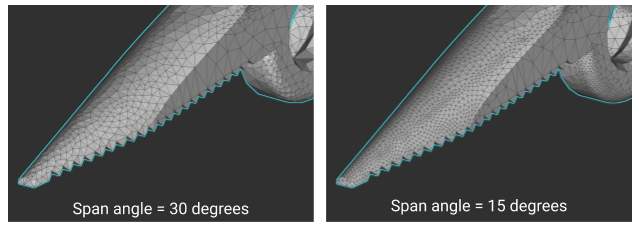
Span Angle: Refines elements that lie on curves. It signifies the maximum allowed angle elements on curved surfaces can span. With a smaller span angle, elements on the curve are more refined to fit the span angle. Mesh will recalculate on curved regions until it reaches each discrete element span angle.
- Coarse = 91-60 deg
- Medium = 75-24 deg
- Fine = 36 – 12 deg (nTop default 30)
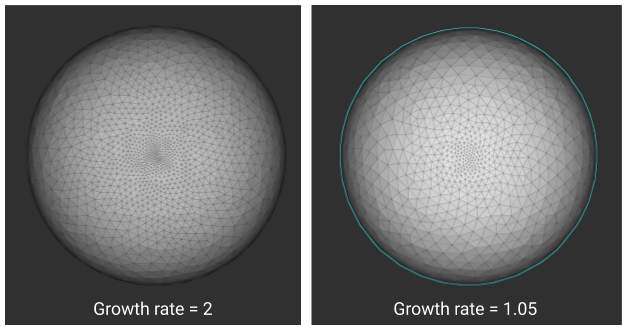
Growth Rate: Specifies the ratio of element size from one element to another. The number can be anything greater than 1: the smaller the number, the more uniform the mesh. The image to the right shows how changing the growth rate from 2 to 1.05 creates a more uniform mesh. A general rule is to use a growth rate of 1.2.

Feature Angle: Controls the degree to which curved surfaces convert to flat edges in a mesh. The value represents the maximum allowed angle between two adjacent planes that define an edge—a lower value results in more planar regions of the mesh where an input surface is curved.
Troubleshooting
- When you have mesh elements clustering together: Increase the Growth Rate, add a Minimum Edge Length
- When high fidelity is needed on curved surfaces: Lower the Chord height, lower the Span angle
- If you have surface divots or self-intersections: Lower the Chord height
- For a more uniform mesh: Lower the Growth Rate, lower the Edge Length
- Why is the progress bar getting stuck? Need to adjust your inputs: Chord height, Span angle, and Growth rate
- Why is it taking so long? Try increasing mesh size.
- Why isn’t my texture captured in the mesh? Check that the initial mesh is detailed enough and add a minimum feature size.
Applications
The Remesh Surface Block is used in workflows when running a simulation, creating an FE mesh, preparing for export, and creating surface lattices. The surface mesh lays the framework for a volume mesh.