
FE Meshes
Creating an FE Mesh is one of the first steps in setting up a Simulation or a Topology Optimization. The image below shows the basic steps for creating an FE Mesh. If you are working with a solid body, we recommend the FE Volume Mesh, and for lattices, we recommend FE Lattice Mesh.

FE Volume Mesh
The FE Volume Mesh block places FE elements over volume mesh elements. The geometric order defines the number of nodal elements placed in the mesh elements.

FE Surface Mesh
The FE Surface Mesh block creates 2D surface elements with ‘isoparametric’ elements. The thickness defined is normal to the surface in the Shell Attribute.
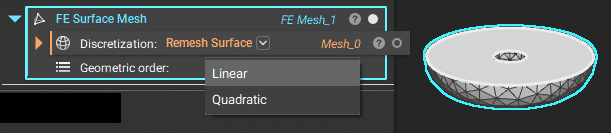
Note: The toolkit block FE Shell Mesh remeshes and creates a surface mesh using the block above.
FE Lattice Mesh
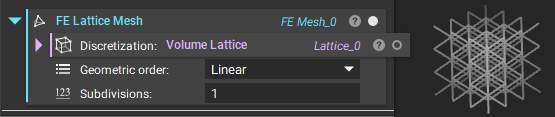
The FE Lattice Mesh block creates beam elements coinciding with lattice beams. The thickness of the beams is defined in FE Attributes (can be nonuniform).
Merge FE Meshes
When some regions are easier to mesh than others, you can mesh them separately and join them using Merge FE Meshes. This process is good for interfacing surfaces.

To merge, at least one node from each mesh must be within the distance threshold. Use distance threshold of at least ½ of mesh size.
Tip: General rules of thumb for elements in FEA
Thermal: at least 1 element across thin or small design features and or parts. Typically linear, unless you start to tie in deflection or stress due to thermal distribution.
Deflection: at least 3 elements across thin or small design features and or parts, and is typically linear.
Stress: at least 5 elements across thin or small design features and or parts. In nTop, use the Quadratic Geometric order (i.e., Mid-side nodes).