
Boolean Operations
Boolean operations can easily be performed on any implicit body in nTop. Boolean blocks are in the Modeling tab.

The table below shows the different Boolean operations performed on a cube and a sphere.

Boolean blocks contain prepopulated Implicit Body List. To bring in a List Type block as an input for one of these blocks, you would first have to delete the prepopulated list.
Boolean Union
The Boolean Union block allows you to join multiple Implicit bodies with an optional blend.

Blend Radius: Adds a fillet of a specified radius to the areas where the merged bodies meet.
To merge more than two bodies, add items to the Implicit Body List by clicking the plus button at the top right. You can remove an item from the list by clicking the minus button next to it.
Boolean Subtract
The Boolean Subtract block allows you to subtract one (or multiple) Implicit bodies from another with an optional blend.
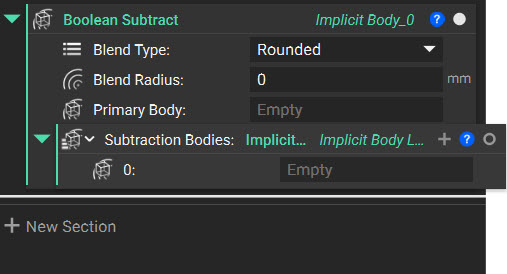
Primary Body: The implicit body you want to subtract from.
Boolean Intersect
The Boolean Intersect block allows you to keep the volume only where your Implicit bodies overlap, with an optional blend.

Tip:
Splitting, cutting, or trimming an object in nTop is just a matter of Boolean subtracting. Subtract the body you wish to split with a plane, created with a Plane or Plane from Normal block.
The field associated with a plane has a value of 0 at the plane. The normal direction of the plane has a positive value, while the opposite direction is negative. Boolean subtracting keeps the part in the direction of the normal where field values are positive.